
Written by: Paul Foster, Founder, CEO, OnePlan | Last updated: July 20, 2026
Key Takeaways for Event Site Planning in 2026
- Event planners now choose between registration platforms that manage attendees but lack scalable site layouts and complex engineering tools that most teams find too costly and slow.
- Accurate, to-scale site planning has become essential for safety, crowd flow, and stakeholder coordination, with 71% of professionals prioritizing attendee safety and over one-third citing crowd management as their top challenge.
- Most events need both registration tools and dedicated site-planning platforms. Expecting one category to fulfill the other’s role creates inaccurate layouts, coordination failures, and expensive rework.
- OnePlan stands out as a purpose-built platform that delivers GIS-accurate, map-based layouts with real-time collaboration, crowd capacity calculators, and auto-generated Bills of Quantities at an accessible price.
Why Accurate Site Planning Now Defines Event Success
According to OnePlan’s 2026 Event Site Planning Report, 71% of event professionals say attendee safety and security is their top priority when planning a site, and over 1 in 3 name crowd safety and flow as their single biggest challenge. A further 44% say accurate measurements and layouts are critical to success. Inaccurate plans still cause overcrowded spaces, inefficient layouts, unnecessary costs, and late rework.
Operational complexity now drives these numbers. A modern festival, road race, or stadium event involves operations, security, traffic management, police, fire and medical teams, vendors, contractors, and local authorities. Every group needs to work from the same physical plan, which shows how central spatial and operational planning has become. When that plan lives in a static screenshot or a fragmented set of emailed PDFs, the problems appear on event day.
Executive Summary: A Practical Evaluation Framework
Separate two distinct jobs before you evaluate any platform.
- Registration and management platforms handle ticketing, attendee data, check-in, email marketing, and post-event analytics. They focus on the attendee journey, not the physical site.
- Site-planning platforms handle to-scale layouts, infrastructure placement, crowd capacity, traffic flow, stakeholder collaboration on a live map, and documentation for permits and safety approvals.
Most planners need both categories. The common mistake is expecting one to do the other’s job. Registration platforms do not produce accurate, to-scale site maps. Site-planning platforms do not process ticket sales. This clear distinction forms the basis of every strong platform decision in 2026.
Industry Landscape: How Today’s Tools Map to Those Two Jobs
With that framework in mind, the current market divides into three main groups.
- Registration and ticketing platforms (Eventbrite, Cvent, Whova, Bizzabo, Swoogo) excel at attendee management, marketing automation, and analytics, yet offer limited or no physical site layout features.
- Manual and non-specialist tools (PowerPoint, Excel, Canva, Photoshop, Google Maps, internal static screenshots) feel familiar and low-cost, but nothing is to scale, real-time collaboration is missing, and version control quickly breaks down.
- Dedicated site-planning platforms (OnePlan) are purpose-built for to-scale, map-based event site layouts with intelligent calculators, real-time collaboration, and auto-generated Bills of Quantities.
Complex engineering software such as CAD, AutoCAD, and Bluebeam sits in a fourth category. These tools provide precision but remain expensive, hard to learn, and designed for engineers rather than event operations teams.
Comparison Snapshot: Registration vs. Site Layout Capabilities
| Platform | Registration & Ticketing | To-Scale Site Layout |
|---|---|---|
| OnePlan | No | Yes — map-based, drag-and-drop, GIS-accurate |
| Eventbrite | Yes — ticketing and registration | No |
| Cvent | Yes — enterprise registration and sourcing | Partial — 3D diagramming for indoor venues |
| Whova | Yes — registration and attendee app | No |
| Bizzabo | Yes — enterprise event OS | No |
| Swoogo | Yes — unlimited events, flat pricing | No |
| PowerPoint / Canva | No | No — not to scale |
| Google Maps | No | No — no object placement or measurement |
| AutoCAD / CAD | No | Yes — engineering-grade precision |
| Iventis | No | Yes — 3D mapping, major events focus |
OnePlan’s first event is free (up to 25 objects), with paid plans starting from around $75 per month. Bizzabo’s Event Experience OS starts at $17,999 per year, and Eventbrite charges a 3.7% + $1.79 service fee per ticket plus a 2.9% payment processing fee per order for paid events. CAD software and specialist operators add costs that most event teams cannot absorb.
Strategic Trade-Offs for Choosing Your Planning Stack
Your ideal toolset depends on event type, team structure, and stakeholder mix. These trade-offs help frame the decision.
- Speed vs. accuracy: Manual tools open quickly but often produce layouts that fail on site. CAD delivers accuracy but remains slow and expensive. OnePlan combines accuracy with drag-and-drop speed, and SoulFest built almost its entire festival map within two days.
- Flexibility vs. standardization: Multi-stage road events and touring organizations need consistent layouts across cities. This need links directly to the speed and accuracy balance, because standardized templates save time. The Tour of Britain uses OnePlan to standardize infrastructure across 8 stages and 1,352 km of route, keeping every local organizer and the central team on the same living plan.
- Single event vs. portfolio: Recurring events gain the most from template functionality and cloning capabilities. OnePlan supports reusable base maps and templates, so planning time drops further each year.
- Internal teams vs. multi-stakeholder coordination: The tool fragmentation mentioned earlier forces planners to juggle registration, communication, scheduling, and site planning across separate platforms. A single source of truth reduces that overhead and keeps every stakeholder aligned.
Current Best Practices for Event Site Planning
- Plan to scale from day one. Every object placed on a site plan should reflect its real-world dimensions. Non-scale layouts produce tents that do not fit, crowd areas that overflow, and vendor placements that block emergency access.
- Establish a single source of truth. Once you have an accurate, to-scale layout, ensure every department works from the same live plan. Operations, security, traffic, medical, and vendors all stay aligned, and version-control chaos disappears. The Jockey Club treats its OnePlan map as “the gospel of truth.”
- Validate crowd capacity before event day. Use a crowd capacity calculator to outline areas and confirm safe standing densities. Always follow local regulations and guidance from relevant authorities such as fire, police, and licensing bodies when setting capacity limits.
- Document for permits and approvals. Export high-resolution, print-ready maps and Bills of Quantities for permit submissions and contractor coordination. Accurate documentation speeds approvals and reduces back-and-forth.
- Reduce site visits through remote planning. The Beirut Marathon cut approximately 20 site visits per year down to just 1–2 by measuring and validating layouts remotely in OnePlan before sending teams on site.
- Build reusable templates. Import existing floor plans and site plans as .png files, scale them onto the map, and reuse them year after year. Plans that once sat unused in a folder become living base maps.
Readiness Assessment Checklist for Your Current Workflow
This checklist helps you decide whether your current workflow is ready for a dedicated site-planning platform.
- Are your current site plans to scale, or are they approximate?
- Do all departments, including operations, security, traffic, and medical, work from the same plan, or do they maintain separate versions?
- Can you confirm crowd capacity for any area in your site without visiting it in person?
- Do you know exactly how much fencing, barrier, and how many portable toilets to order before procurement closes?
- Can stakeholders access the latest version of your plan without you resending a file?
- Do you spend more than a few hours recreating plans for recurring events?
- Have you ever arrived on site to find a layout that did not work as planned?
If you answered “no” to two or more of these questions, a dedicated site-planning platform will deliver immediate, measurable returns.
Common Pitfalls That Derail Event Site Plans
- Fragmented documentation. Special Olympics Virginia described working in silos with low visibility across departments, each using different tools such as Photoshop, Illustrator, and InDesign. This approach produced multiple conflicting plans and reactive coordination on event day.
- Outdated plans in circulation. Static PDFs emailed between teams mean someone always acts on a version that is no longer current. Silverstone’s previous AutoCAD workflow meant the plan was only as current as the last PDF pulled from it.
- Poor stakeholder alignment. Eagle Mountain City’s Events Manager Dawn Hancock previously had to create separate maps for fire, police, facilities, and other departments. That process multiplied effort and introduced inconsistency.
- Guesswork on infrastructure quantities. Ordering too much fencing or too few portable toilets damages budgets and credibility. Without an auto-generated Bill of Quantities, procurement relies on memory and estimation.
- Repeated, costly site visits. Bearfoot Productions completed the design for a new 10,000-capacity festival with only two site visits by validating layouts remotely in OnePlan, which sharply reduced travel.
What Software Event Planners Use in 2026
Most planners still rely on a mix of tools, and often too many at once. Research from Hopskip found that event planners currently use an average of 7–10 different tools per event, spanning registration, communication, scheduling, and site planning. The dominant tools for site planning remain PowerPoint, Excel, Canva, Photoshop, Google Maps, and internal static screenshots, which do not produce to-scale layouts or support real-time collaboration.
The shift underway in 2026 moves teams toward consolidation. The global event management software market is projected to expand from USD 18.6 billion in 2026 to USD 36.8 billion by 2031, at a CAGR of 14.6%, with growth driven by the move from fragmented point solutions to unified platforms. For site planning, the gap between manual tools and engineering software is closing, not because CAD becomes easier, but because purpose-built platforms like OnePlan make accuracy accessible to everyone.
Site Planning Platforms: Why Registration Tools Fall Short and How OnePlan Leads
Registration platforms excel at processing ticket sales, managing attendee data, and delivering post-event analytics. They do not answer the questions that determine whether an event is physically safe and operationally sound. These questions include whether a tent fits, whether 4,000 people can safely occupy a crowd area, where an ambulance accesses the site, and how many sections of crowd barrier to order.
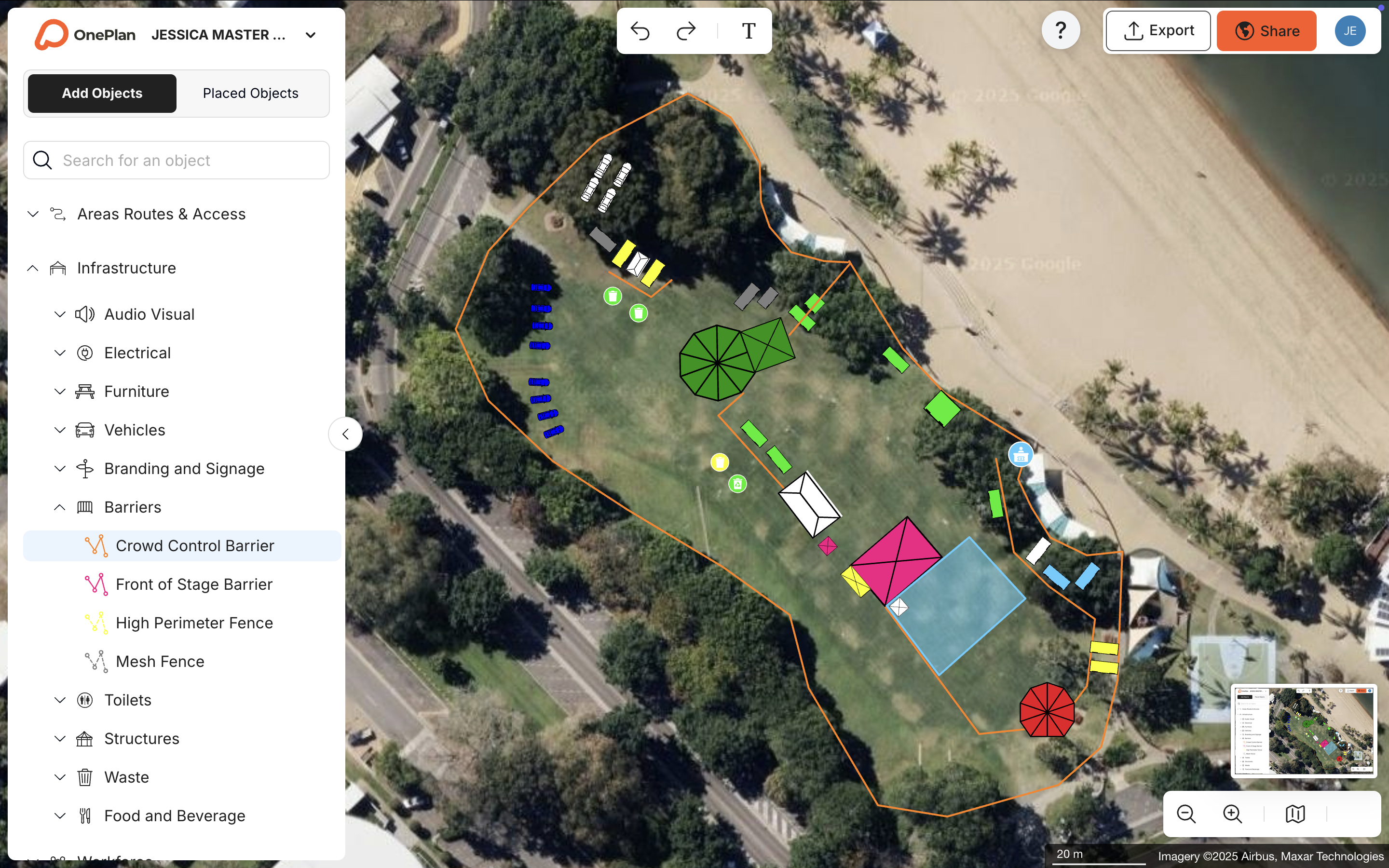
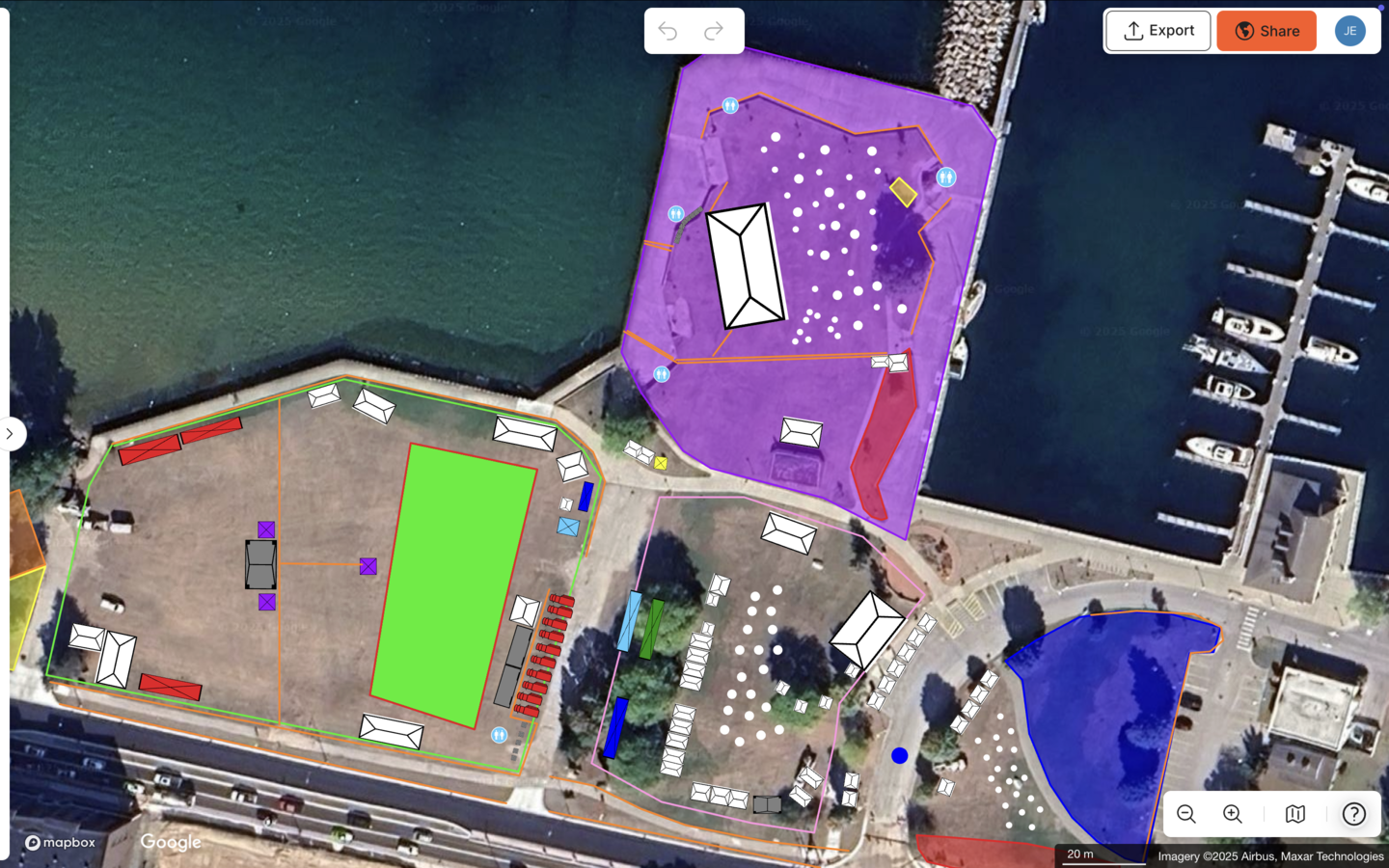
OnePlan answers all of those questions from a browser, without a site visit, an engineering degree, or expensive CAD software. Its base layer is a live, zoomable satellite or street map built on leading GIS technology. Every object placed on it, including tents, stages, crowd barriers, portable toilets, generators, food trucks, and signage, stays accurately to scale as you zoom. The crowd capacity calculator lets you outline any standing area and instantly see its safe capacity. The auto-generated Bill of Quantities turns everything on the map into an exportable inventory list. Traffic and transport tools handle road closures, parking, and ingress and egress flow.
The results show the impact clearly.
- Silverstone achieved a 13x ROI, a 10% reduction in planning days, and a further 5% in supplier efficiencies across 50+ events and 9,000 contractors.
- The Tour of Britain reduced site visits by 75%, saved 300+ hours per year, and achieved a 3x ROI across an 8-stage, 1,352 km national race.
- Eagle Mountain City cut planning time by 70%, from 8–10 hours down to a few hours per event, and reported a 5x ROI.
- Columbus Crew saved 40% of planning time, with their team able to “plan faster, collaborate better, and make decisions in the same meeting.”
OnePlan has powered 200,000 events in 150 countries, from local community fairs to the Paris 2024 Olympic and Paralympic Games.
Event Planning Trends Shaping Tool Choices in 2026
Three trends now reshape what planners need from their tools in 2026.
- Spatial accuracy as a baseline expectation. Integrated technology has become the baseline expectation for event planning in 2026, with fragmentation across multiple tools reading as outdated to modern stakeholders. Planners who still rely on non-scale screenshots face growing risk in permitting, safety reviews, and on event day.
- Consolidation from fragmented tools to unified platforms. Enterprises are shifting investment from basic registration and ticketing toward platforms that unify planning, marketing, engagement, and post-event analytics into a single connected system. For site planning, that shift means one live map that every department uses, not five separate versions.
- Safety and crowd flow as primary design drivers. Given the crowd safety challenges identified earlier, the tools that win in 2026 make it easy to model, document, and defend crowd management decisions before event day, not after.
Frequently Asked Questions
What is the difference between event registration software and event site planning software?
Registration software manages the attendee journey, including ticket sales, check-in, email communications, and post-event data. Site planning software manages the physical event, including to-scale layouts, infrastructure placement, crowd capacity, traffic flow, and documentation for permits and safety approvals. Most events need both, but they solve different problems. Expecting a registration platform to produce an accurate site map is like expecting a ticketing system to design a building.
Can I use OnePlan if I only have one event per year?
Yes. OnePlan’s first event is free, with no payment details required. For a single annual event, you can plan on the free version or pay month-to-month only for the period you need. You do not need to commit to an annual subscription. The same to-scale tools, crowd capacity calculator, and Bill of Quantities remain available regardless of how many events you run.
How does OnePlan help with permits and safety documentation?
OnePlan exports high-resolution, print-ready maps and Bill of Quantities reports that you can submit directly to permitting authorities and contractors. Because every layout is to-scale on a live map, the measurements and crowd capacity figures in your documentation stay defensible and accurate. Always follow local regulations and the guidance of relevant authorities, including fire, police, and licensing bodies, when preparing safety documentation, as requirements vary by region.
Is OnePlan suitable for both indoor and outdoor events?
OnePlan supports both indoor and outdoor events. Outdoor events plan on satellite or street map bases. Indoor venues and stadiums can import existing floor plans as .png files, scale them onto the map, and plan on top of them. Multi-level planning lets venue teams toggle between floors. OnePlan focuses on operational and spatial planning, such as where infrastructure, staff, and crowds go, rather than 3D interior visualization or décor design.
What happens to my existing site plans and floor plans?
You keep your existing work and build on it. Convert existing PDFs, images, CAD-derived files, or drone shots to .png format, import them into OnePlan, scale them onto the map, and build directly on top of them. Floor plans and site plans that previously sat unused in a folder become reusable, buildable base maps that save time every year.
Conclusion: Matching Your Platform Choice to Real-World Risk
The evaluation framework stays simple. Registration platforms handle attendees, and site-planning platforms handle the physical event. In 2026, the operational complexity of events, including larger crowds, tighter safety scrutiny, and more stakeholders, means that accurate, collaborative site documentation has become essential. Strong documentation now separates a smooth event from a failed permit, a crowd bottleneck, or a costly last-minute rework.
OnePlan sits in the middle ground that most planners need. It feels as easy to pick up as a familiar tool, delivers accuracy comparable to engineering software, and stays affordable for a one-off community fair or a year-round stadium operation. It provides a single source of truth that brings operations, security, traffic, medical teams, vendors, and authorities onto one live plan, from the first object placed to the final export for permits.
OnePlan has been recognized as the Best Venue Operations Technology by Sports Business Journal and won the KPMG Tech Innovator of the Year award in 2025. It has powered events at every scale, from local government festivals to the Paris 2024 Olympic and Paralympic Games.