
Written by: Paul Foster, Founder, CEO, OnePlan
Key Takeaways
-
Event site planning in 2026 requires accurate, to-scale maps and real-time collaboration as crowds grow and safety requirements increase.
-
Traditional tools like spreadsheets, PowerPoint, and static images lack scale accuracy, live updates, and multi-stakeholder coordination.
-
Specialized platforms cover ticketing, engagement, and project management, but they do not handle physical site layout, crowd capacity, or permitting documentation.
-
OnePlan fills this gap with drag-and-drop to-scale planning, automatic Bill of Quantities generation, and secure stakeholder sharing on a single live map.
-
Teams using OnePlan report major efficiency gains and ROI. See how OnePlan delivers these efficiency gains for your team.
Why Event Site Planning Is Getting Harder in 2026
Event planning now carries more operational weight than ever. Crowds are larger, safety scrutiny is higher, and more stakeholders need to work from the same plan. Operations, security, traffic, police, fire, medical, vendors, and local authorities all expect accurate, current information.
According to OnePlan’s 2026 Event Site Planning Report, 71% of event professionals name attendee safety and security as their top site-planning priority, and over 1 in 3 identify crowd safety and flow as their single biggest challenge. Yet most teams still plan in PowerPoint, Excel, Canva, Photoshop, Google Maps, or internal static, top-view screenshots and plan files. None of these tools are to scale, none update in real time, and none keep every department on the same version.
The alternative, CAD and engineering software, is accurate but expensive and complex. It is built for technical drafters, not event professionals. The gap between these two extremes is exactly where the right software choice matters most in 2026. To understand where that gap exists, review what each major category of event software delivers and what it leaves out.
Best for Large Conferences: Enterprise Conference Platforms
Enterprise conference platforms handle multi-track session scheduling, abstract management, complex registration rules, and attendee-facing apps at scale. These features make them ideal for teams running large-scale or high-volume programs that need longitudinal performance analysis and live coordination. This capability comes at a cost, with pricing typically starting around $10,000–$25,000 annually for full-featured tiers. However, these platforms focus on attendee management, not spatial or site planning, so venue layout and crowd-flow documentation still require a separate tool.
Best for Attendee Engagement: Mobile Apps and Engagement Suites
Mobile event apps and engagement platforms deliver personalized agendas, push notifications, networking features, and live polling. They excel at the attendee-facing experience for conferences, trade shows, and corporate events. Pricing varies based on attendee volume and selected features. These platforms do not include spatial planning capabilities, so they cannot produce a to-scale site map, calculate crowd capacity, or generate a Bill of Quantities for permitting.
Best for Venues & Ticketing Operations: Venue Management Platforms
Venue management platforms handle booking calendars, CRM, contract management, and food-and-beverage operations for stadiums, arenas, and conference centers. They perform strongly for revenue management and internal scheduling. Pricing ranges from fixed monthly SaaS tiers to custom enterprise quotes. Their limitation lies in static floor plans and seating charts, which appear as fixed images that cannot be edited collaboratively, updated in real time, or used to model crowd flow and infrastructure placement.
Best for Public Ticketing: Ticketing and Access Control Platforms
Public-facing ticketing platforms manage online sales, access control, and box-office operations for festivals, concerts, and public events. They integrate well with marketing tools and provide strong sales analytics. Pricing usually combines commission-based fees (typically 3–6% of ticket revenue) with a flat fee per ticket and separate payment processing charges. These platforms stop at the gate and provide no tools for planning the physical site, coordinating infrastructure, or documenting layouts for safety sign-off.
Best for Project Logistics: General Project Management Tools
General project management tools use task boards, Gantt charts, and shared document libraries to keep production timelines and vendor communications organized across large event teams. They are flexible and widely adopted. Pricing ranges from free tiers to hundreds or thousands of dollars per user per month for business and enterprise plans. These tools remain text and task-based, so they cannot produce a geo-accurate site map, model crowd capacity, or replace the spatial documentation that permitting and safety authorities require.
Best for Site & Venue Planning: OnePlan
Pricing: First event free (up to 25 objects, no payment details required). Paid plans from around $99/month. Annual billing saves approximately 20%.
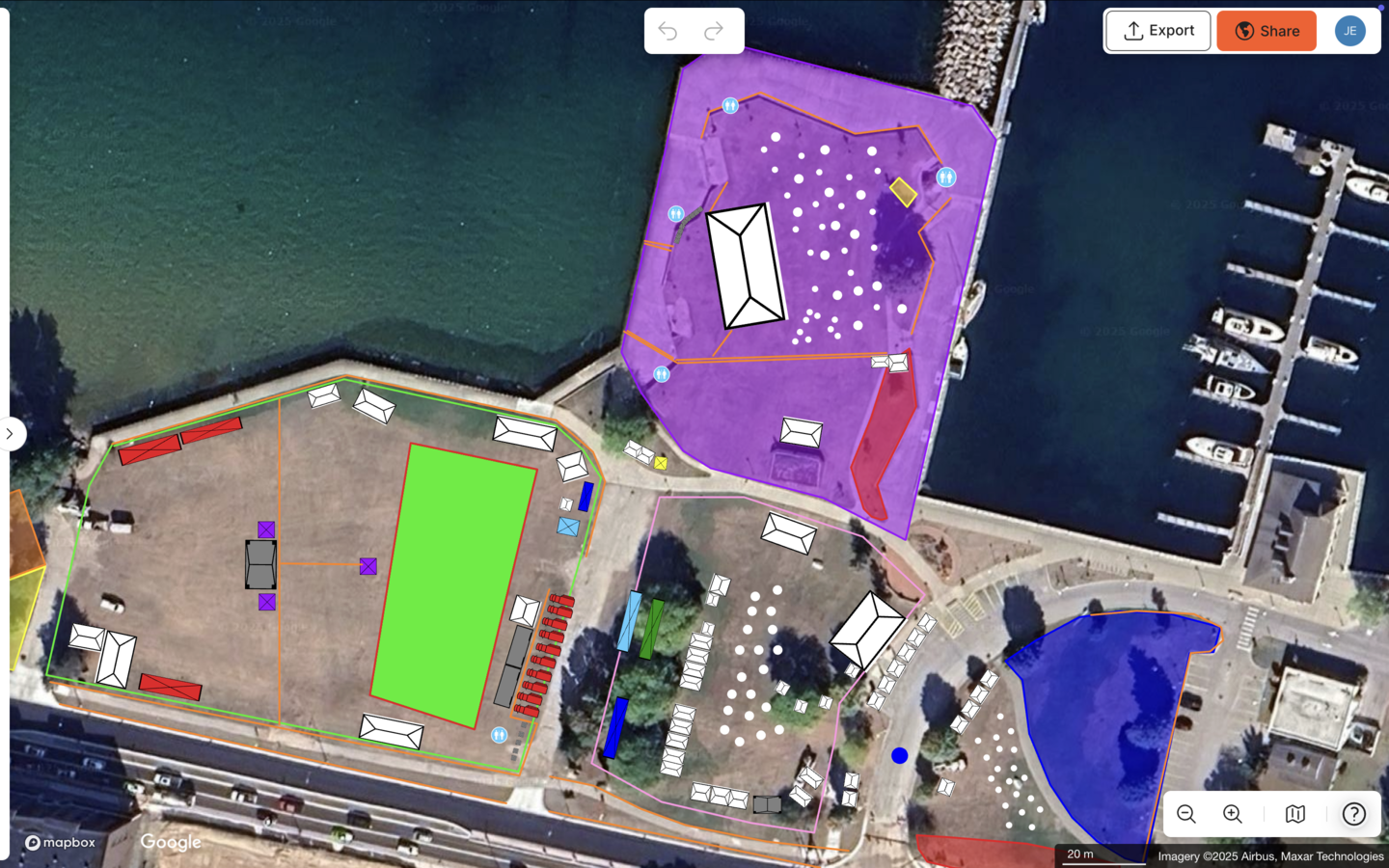
OnePlan focuses on the part of event planning that other software categories ignore: the physical site. The browser-based platform lets planners drag and drop thousands of to-scale event objects, including tents, stages, crowd barriers, fencing, portable toilets, generators, food trucks, signage, vehicles, and staff, onto a live satellite or street map. Every object stays accurately to scale as you zoom, so a 2×2 m tent on the map reflects exactly how it will fit on the ground.
The platform’s calculators handle the spatial math automatically. You outline any area and OnePlan returns its size and safe crowd capacity based on a selectable people-per-square-meter density. The Beirut Marathon’s Race Director called this “so helpful to measure how many people you’re going to fit in a small area.” Everything placed on the map auto-generates a Bill of Quantities that exports to Excel or CSV, turning a finished plan into an accurate procurement list without re-keying figures. Bearfoot Productions used this to order over 8 km of fencing, including 1,000 Heras panels and 1,500 pedestrian barriers, with no guesswork.
Real-time collaboration with role-based permissions, either editable or view-only, keeps every stakeholder working from one live plan instead of multiple emailed versions. Silverstone’s Senior Event Manager describes OnePlan as “that single source of truth, it’s always up-to-date and allows for instant collaboration, especially in our case with suppliers,” and the venue reports a 13x ROI, a 10% reduction in planning days, and a 5% gain in supplier efficiencies across 9,000 contractors.
Existing PDFs, CAD-derived files, drone photos, and floor plans import as .png overlays and scale onto the map. Planners build on top of what they already have rather than starting from scratch. Multi-level planning lets venues toggle between floors.
Results stay consistent across event types. The Tour of Britain reduced site visits by 75%, saved more than 300 hours a year, and achieved a 3x ROI across an 8-stage, 1,352 km national race. Eagle Mountain City cut planning time by 70% and reported a 5x ROI by replacing separate maps for fire, police, and facilities with one comprehensive plan. Mosaic’s Senior Producer sums it up: “OnePlan makes planning easier, quicker, and more accurate. It definitely saves time and is less expensive than contracting a CAD designer.”
OnePlan has powered 200,000 events in 150 countries, from community fairs and county shows to Formula 1 circuits and the Paris 2024 Olympic Games.
Event Software Comparison Table: Where OnePlan Fits
The table below summarizes how each software category supports different event planning needs and highlights where OnePlan’s spatial planning capabilities fill the gap left by other tools.
|
Tool Category |
Pricing (indicative) |
Best For |
Key Strengths |
Drawbacks |
|---|---|---|---|---|
|
Large Conference Platforms |
Multi-track conferences, abstract management |
Registration, session scheduling, attendee data |
No spatial or site planning capability |
|
|
Attendee Engagement Apps |
Varies by attendee volume and features |
Conferences, trade shows, corporate events |
Personalized agendas, networking, live polling |
No site mapping, crowd capacity, or Bill of Quantities |
|
Venue Management Platforms |
Varies from fixed monthly SaaS tiers to custom enterprise quotes |
Booking, CRM, F&B for stadiums and arenas |
Revenue management, contract management |
Static floor plans, no real-time collaborative editing |
|
Public Ticketing Platforms |
Mix of 3–6% commission + flat per-ticket fees + processing charges |
Festival and concert ticket sales |
Online sales, access control, marketing integration |
No physical site planning or safety documentation |
|
Project Management Tools |
Free tiers to hundreds or thousands per user/month for business/enterprise |
Task tracking, timelines, vendor comms |
Flexible, widely adopted, good for logistics |
Text and task-based only, no geo-accurate site maps |
|
OnePlan |
Festivals, venues, road events, local government |
Focused on operational and spatial planning, not 3D interior visualization |
What Apps Event Planners Commonly Use Today
Most planners started with a toolkit built from PowerPoint, Excel, Canva, Photoshop, Google Maps, or internal static, top-view screenshots and plan files. Each tool solves a fragment of the problem. Google Maps shows the location, Excel tracks the inventory, and Photoshop layers shapes on a screenshot. None of these tools are to scale, none update in real time, and each department ends up with its own separate version.
The industry is shifting in 2026 toward a single source of truth. Teams want one live, map-based plan where every stakeholder, internal and external, works from the same document. Columbus Crew’s Director of Guest Experience described the pre-OnePlan reality as “old maps, a lack of collaboration, and the struggle of having data in too many places”. That challenge resolved with a 40% reduction in planning time after moving to a single collaborative platform. The Jockey Club calls its OnePlan map “the gospel of truth.”
The 7 Stages of Event Planning and the Tools That Fit Each Stage
-
Concept & feasibility. General project management tools and spreadsheets work well for budgeting and timeline scoping. OnePlan’s free first event lets you drop a rough site layout on a map immediately and test whether the venue fits the concept.
-
Permitting & approvals. OnePlan exports print-ready, high-resolution site maps up to A0 and Bill of Quantities reports. These are the documents safety authorities, fire marshals, and local councils typically request.
-
Site design & infrastructure planning. This stage is OnePlan’s core strength. Drag-and-drop to-scale objects, crowd capacity calculators, and area measurement tools replace hand-drawn sketches and non-scale screenshots.
-
Vendor & supplier coordination. OnePlan’s role-based permissions let vendors and contractors access a live view-only plan, so teams stop emailing static PDFs. The Bill of Quantities tells suppliers exactly what to deliver and where.
-
Safety & crowd management. Crowd capacity calculators, emergency vehicle routes, evacuation planning, and ingress and egress flow tools sit inside the same plan. The Cheese & Chilli Festival uses OnePlan’s crowd area, queue, and evacuation calculators for risk assessments and management plans.
-
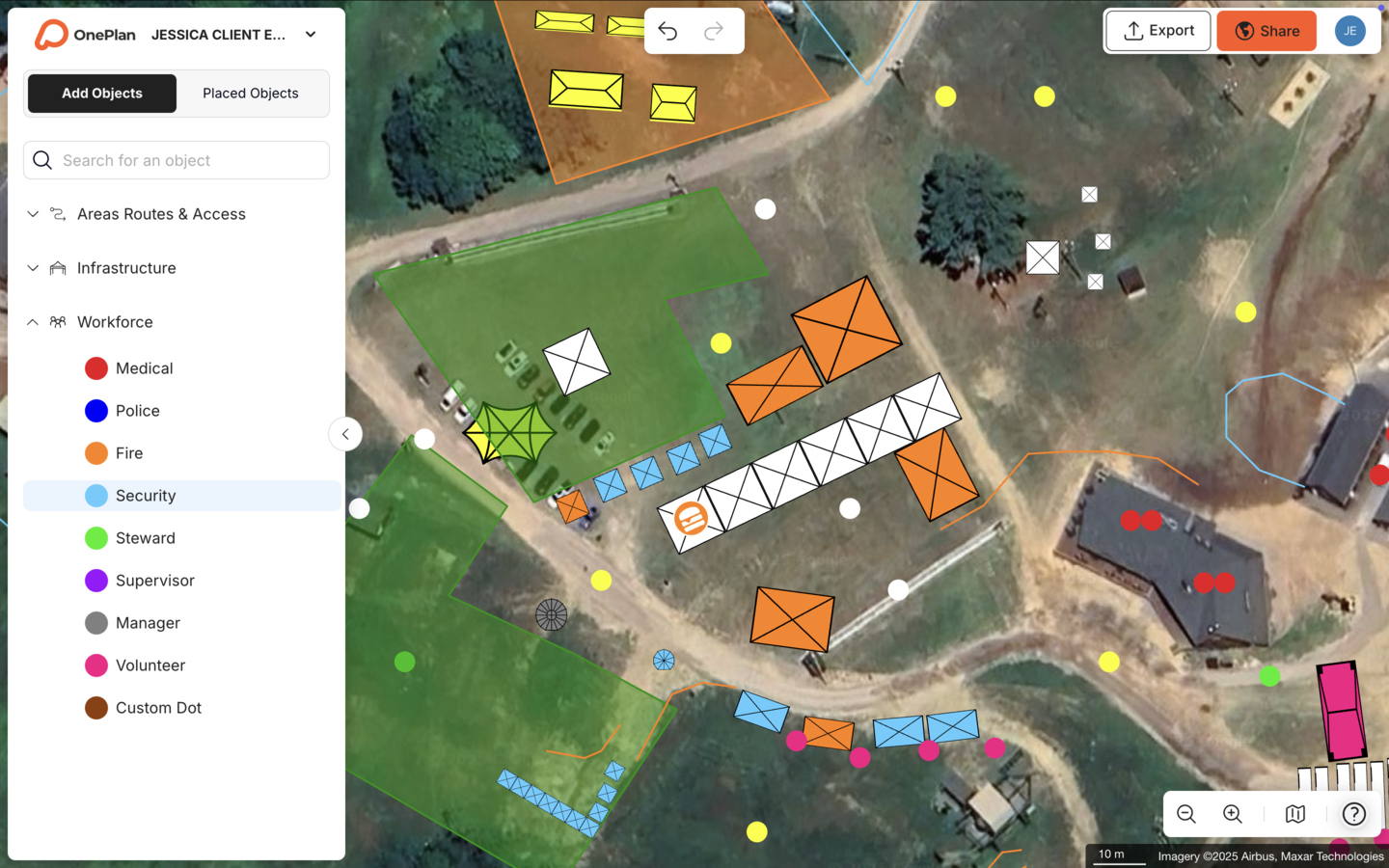
Staffing & logistics. Workforce dots placed on the map assign roles, shift times, and routes to every staff member, including security, medical, stewards, and volunteers, all in the same plan.
-
Event-day operations & post-event review. Live, password-protectable share links keep every stakeholder aligned on event day. Reusable templates carry the plan forward to next year and save setup time for recurring events.
Budget vs. Enterprise Trade-Offs: One-Off vs. Year-Round Use
Cost often becomes the main objection to adopting new software, especially for one-off events or small teams. OnePlan’s pricing model reduces that barrier. The first event is free with no payment details required and covers up to 25 objects. That allowance is enough to plan a community market, a small festival, or a single road-race finish area and share it with stakeholders.
Recurring programs see compounding value. A venue running 50 or more events a year, a local government team planning a seasonal calendar, or a race series standardizing layouts across multiple cities can reuse templates and workflows. Eagle Mountain City’s results, detailed earlier, show how ROI compounds for recurring community events. Silverstone’s outcomes, also mentioned above, reflect the value of a single source of truth across a high-volume venue program.
For genuinely one-off events, month-to-month paid plans let teams pay only for the period they need and stop afterward. No annual commitment is required.
Frequently Asked Questions
What is the best event planning software for festivals in 2026?
For festival site planning, including stages, crowd areas, vendor pitches, fencing, toilets, and infrastructure to scale, OnePlan is the strongest dedicated option. It combines drag-and-drop map-based design, crowd capacity calculators, and an auto-generated Bill of Quantities in one browser-based platform. For attendee-facing features such as ticketing and mobile apps, teams typically use a separate ticketing or engagement platform alongside OnePlan. The two categories solve different problems, with OnePlan handling the physical site and ticketing platforms handling the audience.
Is OnePlan suitable for indoor venues as well as outdoor events?
Yes. OnePlan supports both outdoor site planning and indoor venue planning, including multi-level spaces where you toggle between floors and share only the relevant level with each stakeholder. It focuses on operational and spatial planning, such as where infrastructure, staff, and crowds go, rather than 3D interior visualization or banquet-décor rendering. Venues import existing floor plans as .png overlays and build on top of them.
How does OnePlan help with safety compliance and permitting?
OnePlan produces the documentation that safety authorities and permitting bodies typically request. Teams export print-ready, high-resolution site maps up to A0, crowd capacity figures based on selectable density standards, emergency vehicle routes, and Bill of Quantities reports for contractors. Accurate, to-scale layouts make Safety Advisory Group meetings faster and better documented. OnePlan is a planning and mapping tool, so teams should always follow local regulations and the guidance of fire, police, and licensing authorities for final compliance decisions.
Can stakeholders access the plan without buying a license?
Yes. OnePlan generates secure, password-protectable view-only share links that any stakeholder, including police, fire, medical teams, vendors, and local councils, can open in a browser without an account. They always see the latest version of the plan, with no file attachments to track. For stakeholders who need to edit, role-based permissions such as Owner, Admin, and Member control exactly what each person can change.
How long does it take to learn OnePlan?
Most planners place objects on a map within seconds of signing up. OnePlan uses drag-and-drop controls and is built for events and operations professionals, not engineers, so no design degree or technical background is required. A free OnePlan Academy course provides a structured introduction with a shareable completion certificate for anyone who wants a more guided start.
Plan Your Next Event the Easy Way
Event site planning has grown too complex for spreadsheets and static screenshots, and CAD still feels like overkill for most event professionals. OnePlan delivers an accurate, to-scale, collaborative middle ground. Teams work from a live map where every stakeholder shares one plan, crowd capacities are calculated in seconds, and the Bill of Quantities builds itself.
The platform scales from a one-off community fair to a Formula 1 circuit. Your first event is free, with no payment details required.